AI call notes
Just talk. The minutes are ready straight away.
With clockin AI call notes, you record conversations at the touch of a button and automatically get a summary and to-dos for your team



4.9
9,000+
Schneller an Dein Geld
Keep talking. clockin writes the minutes.
With a customer, in a team meeting or at a handover: one tap and clockin captures everything. The summary and to-dos are in the office straight away, whatever language was spoken.
Between the conversation and the desk, the most important details get lost.
“What did we agree again?”
Without a recording it's your word against theirs. You pay for the complaint.
“Who's taking care of that?”
The morning huddle is over and nobody's quite sure who's doing what.
“Does the office know yet?”
When someone covers sick leave or shifts change, the knowledge stays with the colleague who isn't there.
Here's what it looks like
What you say becomes finished minutes
Elektroinstallation im Mehrfamilienhaus: Klick Dich durch die Rechnungen.
Auftrag bestätigt
Bevor es losgeht, rechnest Du 30 % an. Die Anzahlungsrechnung entsteht direkt aus der Auftragsbestätigung.
Ohne Abtippen und ohne das Material vorzustrecken.
Rohinstallation fertig
Die Leitungen liegen, jetzt rechnest Du die nächsten 40 % ab. Auch die Abschlagsrechnung entsteht aus der Auftragsbestätigung, Kunde und Auftrag sind schon drin.
Du rechnest ab, was fertig ist, und nicht erst am Ende.
Alles fertig, alles abgerechnet
Die Schlussrechnung zeigt den ganzen Auftrag. Die Anzahlung und den Abschlag zieht clockin automatisch ab, Du musst nichts gegenrechnen.
Der Kunde zahlt nur, was noch fehlt.
Wer hat schon gezahlt?
Der Kunde überweist erst einen Teil. Du trägst die Zahlung an der Rechnung ein und siehst in der Übersicht sofort, was offen, bezahlt oder überfällig ist.
Schluss mit der Zettelwirtschaft bei offenen Posten.
Vereinfachtes Beispiel. Beträge mit 19 % Umsatzsteuer.
Prefer to try it yourself?
Try call notes free for 14 days or let us show you in 15 minutes.
How it works: tap, talk, done

How businesses like yours use call notes
Final inspection with the customer
Record defects, requests and extra work right there during the walkthrough. The office has the minutes before you're back in the van
On-site consultation
What the customer wants, which materials are missing, when work continues: all captured in one conversation and turned into tasks for the team
Site walkthrough
Just talk during the walkthrough with the client. Special requests and new areas go straight to the site manager
„Die Messe ist vorbei, die Rechnung noch nicht.“
Mit clockin stellst Du vor dem Event die Anzahlung und nach dem Abbau die Schlussrechnung, direkt aus dem Angebot. Die Stunden für Auf- und Abbau hat Dein Team schon in clockin erfasst, die Anzahlung zieht clockin automatisch ab.
Was auf der Baustelle passiert, steht schon auf der Rechnung
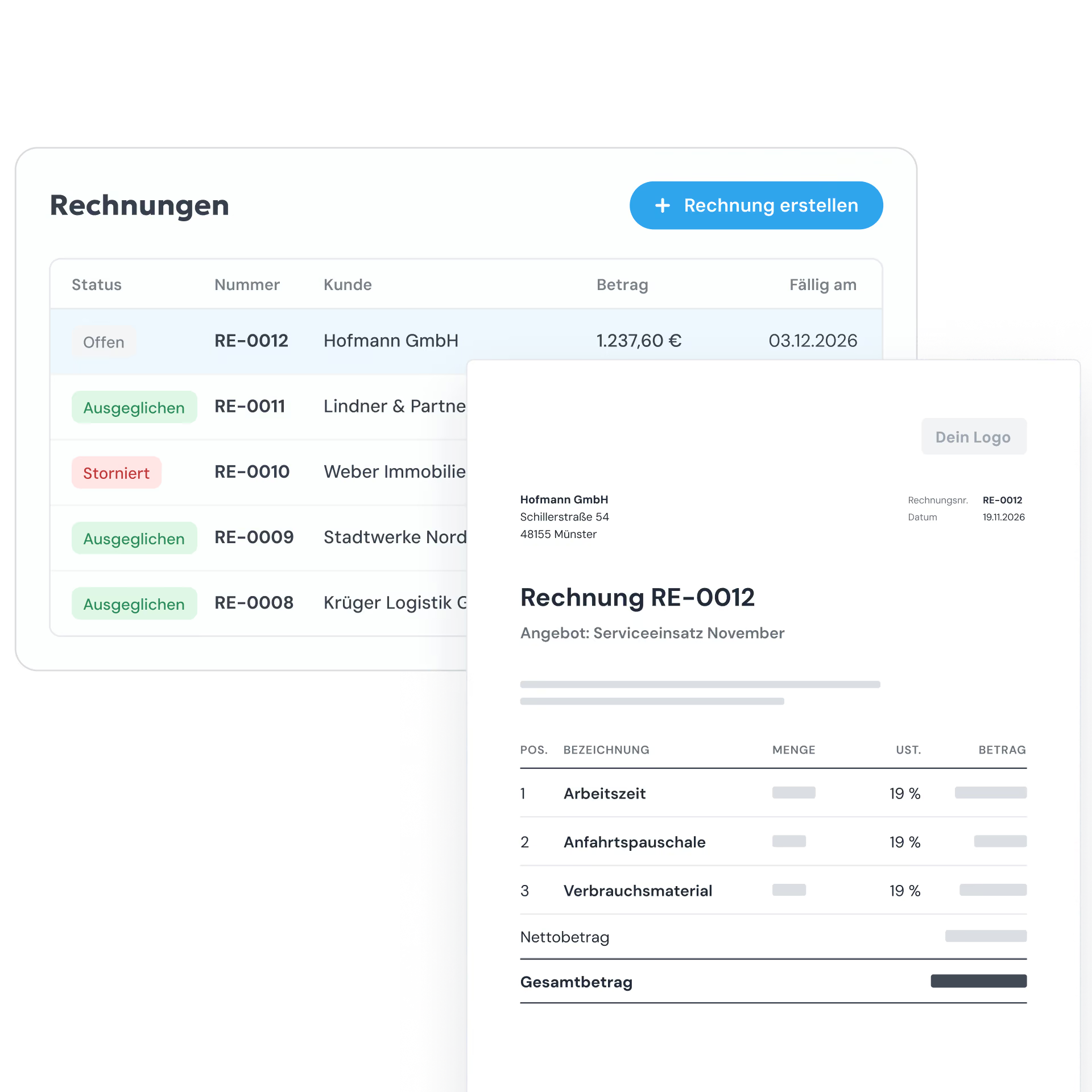
In clockin steht auf der Rechnung, was Dein Team im Projekt stempelt und am Auftrag an Material bucht. Du überträgst nichts mehr, Du prüfst nur noch und schickst ab. So geht keine Stunde und kein Material verloren.
Die Arbeitszeit wird direkt am Auftrag erfasst, in der App, die Dein Team schon nutzt.
Per Scan in der App, dort wo es verbaut wird.
Stunden und Material stehen als Positionen drauf. Du prüfst und schickst ab.
Ein Preis für Deinen ganzen Betrieb
- Rechnungen
- E-Rechnung
- Angebote
- Auftragsbestätigungen
Ein Modul, beides drin: Mit den Rechnungen bekommst Du auch Angebote und Auftragsbestätigungen, ohne Aufpreis. Du zahlst nicht pro Nutzer, sondern eine Pauschale je Lizenzband. Wähl aus, wie viele Leute bei Dir mit clockin arbeiten.
für 1 bis 20 Mitarbeitende
Ein fester Betrag, egal wie viele im Büro Angebote und Rechnungen schreiben. Buchbar in jedem clockin-Paket.
Frequently asked questions
What can I use call notes for day to day?
For customer appointments, inspections, team meetings and handovers: anywhere agreements would otherwise end up on scraps of paper
Where do I find the finished notes?
In the Office Center under Communication, with the summary, tasks, original recording and transcript
Can I edit the minutes afterwards?
Yes, you can edit the summary and tasks at any time
Can I try call notes?
Yes, for 14 days with all features, no automatic subscription and no payment details
Wie kommen die Rechnungen zum Steuerberater?
Über den Export. Du lädst Deine Rechnungen als ZIP-Datei herunter, darin steckt eine CSV-Übersicht und jede Rechnung als PDF. Die Datei schickst Du Deinem Steuerberater, Deine Buchhaltung bleibt dort, wo sie ist. In clockin siehst Du dazu jederzeit, welche Rechnungen offen, bezahlt oder überfällig sind.
Live-Webinar · kostenlos
Deine erste Rechnung mit clockin, live gezeigt
Nils aus unserem Customer Success zeigt in 45 Minuten, wie Du Anzahlung, Abschläge und Schlussrechnung schreibst, die E-Rechnung verschickst und den Export für den Steuerberater machst. Danach beantwortet er Deine Fragen.
Dienstag, 8. Dezember 2026 · 11:00 bis 11:45 Uhr